
The most recent survey of Backblaze found that the annual failure rate of SSDs was 0.98% and that of disk drives was 1.64%. Although SSDs are generally reliable and failures are relatively uncommon, they are not immune to data loss. However, users can often recover the lost file, but the success of the data recovery process is hindered in SSDs due to SSD wear level and TRIM commands.
What Makes SSDs Different?
SSDs rely on a controller and firmware to manage and store data in NAND flash memory instead of spinning magnetic platters used in traditional HDDs.
TRIM command and wear-leveling are two technologies that make SSD data recovery challenging.
What is SSD Wear Level?
Wear leveling is an SSD technique where write and erase cycles are distributed evenly across NAND flash memory cells to prevent premature wear. This technique helps in expanding the lifespan of your SSD.
How does wear leveling affect data recovery?
SSD wear results in data being scattered around different blocks, which means there’s no logical address for recovery tools to follow and recover the traces of deleted data, making data recovery impossible.
What does TRIM do, and how does it impact data recovery?
The TRIM command (also known as the Advanced Technology Attachment command) identifies unused SSD blocks eligible for erasure. It means this SSD optimization command works like an advanced cleaner that helps you organize your SSD.
Once the TRIM command is executed on the SSD, it physically clears the data blocks, which means there is nothing left for the recovery software to scan, making deleted files unrecoverable.
And, Windows, macOS, and Linux operating systems have TRIM enabled by default.
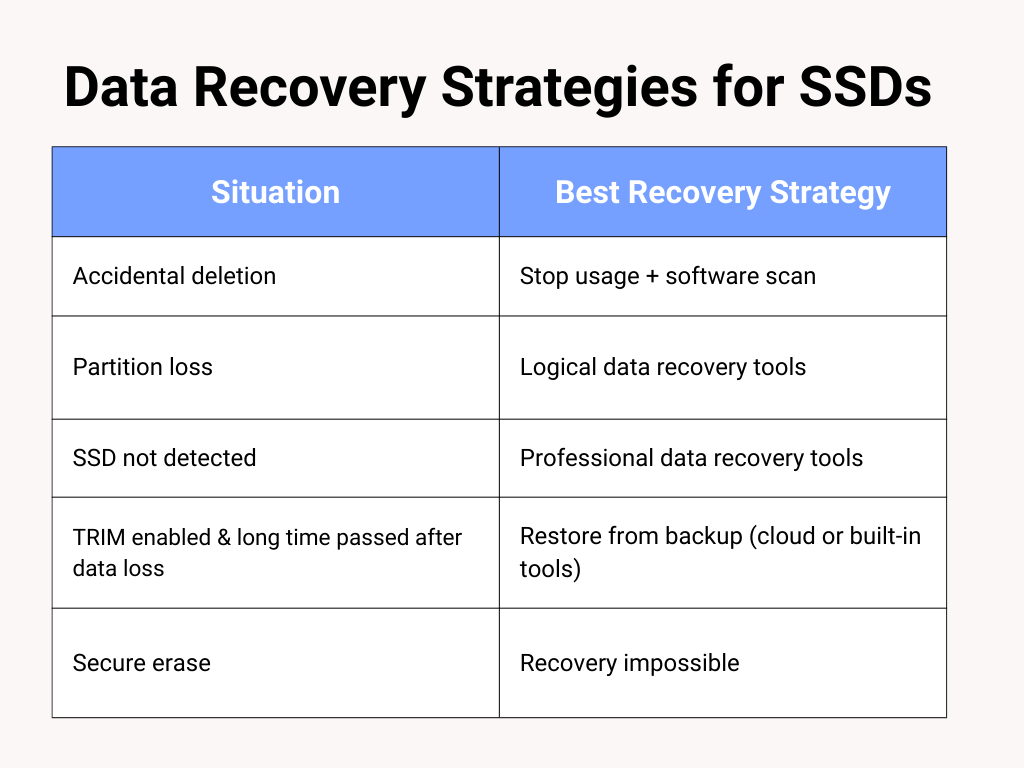
Data Recovery Strategies for SSDs
Despite the above-mentioned limitation connected to the SSD wear level and the enabled TRIM command, successful data recovery is possible only if:
- Stop using the device immediately when data loss occurs to prevent overwriting of lost files.
- Check if the TRIM command is disabled
- Use reputable data recovery software to recover lost files from SSD only if the loss is due to accidental deletion, formatting, or partition loss.
- If you are in the habit of regularly backing up your data on the cloud or in-built backup tools, use them to restore lost SSD files.
SSD Wear Level, TRIM Command, and Data Loss: Practical Considerations
Overall, SSD wear level and the TRIM command boost a device’s performance and prolong the lifespan of its SSD. A potential drawback of these mechanisms is that they can hinder data recovery.
So, you must prevent data loss by backing up your sensitive data regularly. If the data has been recently lost, act immediately, disable the TRIM command, and use professional data recovery to restore lost files.